86547
EAN - 8717278.86547.8
User Manual - Karaoke Microphone

Introduction
To make correct use of the functions and to know the system’s connections and usage, please read this user manual carefully before using the product. Keep this manual in a safe place for future reference.
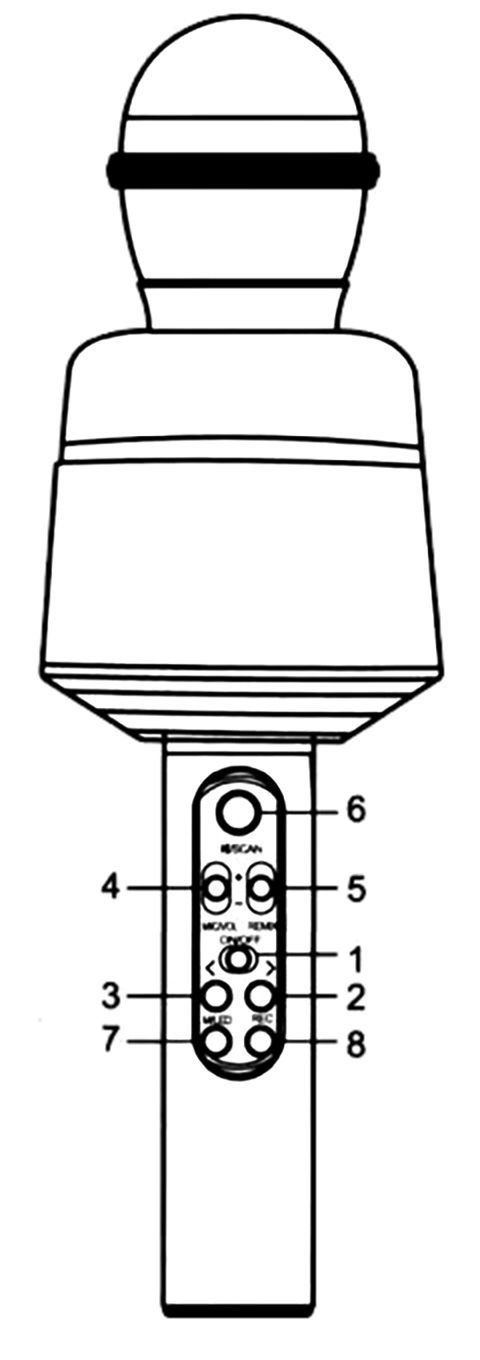
Button Functions
- ON/OFF
- Press: Next song | Hold: Volume up
- Press: Previous song | Hold: Volume down
- Adjust microphone level
- Adjust echo level
- Press: Play/Pause | Hold: Change voice effect
- Press: Change mode | Hold: Lighting mode
- Remove original voice from song
Wireless Karaoke
Enable Bluetooth on smartphone. Connect to microphone with name 'PartyFunLights'. When connected a sound prompts.
Selfie function
- Press the 7 button to switch from wireless mode to selfie mode;
- Enable wireless in the mobile phone, search “shutter”, click connect.
- Open the photo interface of the mobile phone, press 3 or 4 button to take photos.
Note: Requires 4.2.2 or higher version for Androld or 6.0 or higher version for iOS. It does not support other versions. It does not work with a mobile phone which has an independent and physical photograph button.
Recording with Smartphone
Use a karaoke app (like Kugou Music) on your smartphone to record your songs. Follow the instructions of the app.
Specifications
Output Power: 10W
Frequency Range: 100HZ~10KHZ
Max Sound Level: > 115DB 1KHZ TDH < 1%
Charging Power: DC5V
Power Supply: Built-in 18650 Li-battery